Encrypted Model
Send end-to-end encrypted messages to BLACKBOX AI models running inside a verified GPU enclave.
The Encrypted Model API lets you communicate with BLACKBOX AI models over a fully end-to-end encrypted channel. Your messages are encrypted on your machine before they leave — the server, the network, and everything in between only ever sees ciphertext. The GPU enclave is cryptographically attested, so you can verify you are talking to genuine hardware before sending anything.
The encrypted endpoint is separate from the standard inference API. Each organisation gets its own dedicated host of the form https://{organisation}.blackbox.ai, and every request is scoped to a specific model via /enc/{provider}/{model}/.... The examples on this page use mycompany.blackbox.ai as the organisation and nvidia/nemotron-49b-v1.5 as the model — replace both with the values that apply to your account.
Getting Your API Key
Create an API key from your BLACKBOX AI dashboard. The same key used for the standard API works here.
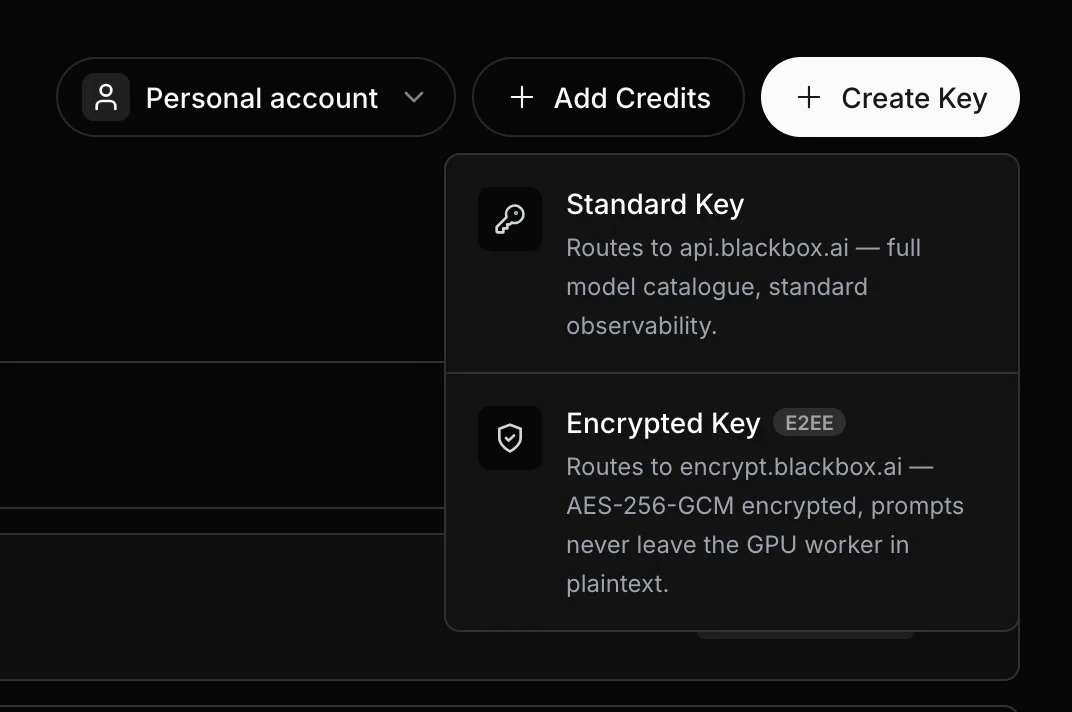
Keep your API key secret. Never commit it to version control or share it publicly. Store it as an environment variable: export BLACKBOX_API_KEY=sk-xxxxxxxxxxxxxxxxxxxxxxxx
Endpoints
All endpoints are served from https://{organisation}.blackbox.ai and are scoped to a specific model via /enc/{provider}/{model}/.... For example, to talk to nvidia/nemotron-49b-v1.5 on the mycompany organisation you would hit https://mycompany.blackbox.ai/enc/nvidia/nemotron-49b-v1.5/health.
| Method | Endpoint | Auth required | Purpose |
|---|---|---|---|
GET |
/enc/{provider}/{model}/health |
No | Confirm the model's enclave is up |
GET |
/enc/{provider}/{model}/attestation |
No | Fetch the server's public key and GPU attestation report |
POST |
/enc/{provider}/{model}/message |
Yes | Send an encrypted message, receive an encrypted reply |
POST |
/enc/{provider}/{model}/message_stream |
Yes | Same as /message but streams the reply token-by-token |
Step 1 — Check the Service
Before making any requests, confirm the service is healthy.
curl https://mycompany.blackbox.ai/enc/nvidia/nemotron-49b-v1.5/healthimport requests
resp = requests.get("https://mycompany.blackbox.ai/enc/nvidia/nemotron-49b-v1.5/health")
print(resp.json())const resp = await fetch("https://mycompany.blackbox.ai/enc/nvidia/nemotron-49b-v1.5/health");
console.log(await resp.json());Response:
{
    "status": "healthy",
    "crypto_status": "ready",
    "server": "secure-worker-server",
    "version": "1.0.0",
    "timestamp": 1783706215.5286465,
    "worker_pid": 64088
}
No API key is needed for /health or /attestation. These endpoints are public.
Step 2 — Fetch the Server's Public Key
Retrieve the server's public key and GPU attestation report. You will use the public_key field to derive a shared encryption key in the next step.
curl https://mycompany.blackbox.ai/enc/nvidia/nemotron-49b-v1.5/attestationimport requests
resp = requests.get("https://mycompany.blackbox.ai/enc/nvidia/nemotron-49b-v1.5/attestation")
attestation = resp.json()
server_public_key = attestation["public_key"]
print(server_public_key)const resp = await fetch("https://mycompany.blackbox.ai/enc/nvidia/nemotron-49b-v1.5/attestation");
const attestation = await resp.json();
const serverPublicKey = attestation.public_key;
console.log(serverPublicKey);Response:
{
    "public_key": "-----BEGIN PUBLIC KEY-----\nMHYwEAYHKoZIzj0CAQYFK4EEACIDYgAEq...\n-----END PUBLIC KEY-----\n",
    "session_id": "f3c1a8b2-9d4e-4a6f-8b21-7c5e0d9a1b34",
    "nonce_b64": "zhFM/EVAfYF7aRu4WV+MjIqbxcSPk0Ik5F68zVBKano=",
    "signature": "MGUCMQC...",
    "report_json": "{...}",
    "gpu_eat": "{...}"
}public_keystringPEM-encoded P-384 public key of the GPU enclave. Use this to derive the shared AES-256 encryption key via ECDH.
session_idstringOpaque session identifier bound to this attestation. You must include it in the body of every subsequent /message and /message_stream call. If the session expires the server returns 409 Conflict — fetch a new attestation to get a new session_id and reset the nonce.
nonce_b64stringBase64-encoded nonce included in the attestation report. Used to verify the report is fresh.
signaturestringECDSA signature over the attestation report, signed by the enclave's private key.
report_jsonstringRaw GPU attestation report in JSON format. Can be independently verified against the GPU manufacturer's certificate chain.
reportobjectParsed attestation report object returned directly by the GPU.
gpu_eatstringGPU Entity Attestation Token — a signed token from the GPU hardware confirming the enclave's identity.
Step 3 — Encrypt Your Message
This step runs entirely on your machine. The encryption uses:
- ECDH (P-384) to derive a shared secret with the server
- HKDF-SHA256 to derive a 256-bit AES key from the shared secret
- AES-256-GCM to encrypt your conversation history
- ECDSA-SHA256 to sign the encrypted payload
# Requires: bash 4+, curl, python3 (stdlib only — no pip needed)
# Save the attestation response from Step 2 first:
#   curl https://mycompany.blackbox.ai/enc/nvidia/nemotron-49b-v1.5/attestation > /tmp/attestation.json

python3 - /tmp << 'PYEOF'
import base64, json, os, sys

work = sys.argv[1]

with open(f"{work}/attestation.json") as f:
    att = json.load(f)

session_id = att["session_id"]   # bind every message in this session to it

from cryptography.hazmat.primitives.asymmetric import ec
from cryptography.hazmat.primitives import serialization, hashes
from cryptography.hazmat.primitives.kdf.hkdf import HKDF
from cryptography.hazmat.primitives.ciphers.aead import AESGCM

server_pub = serialization.load_pem_public_key(att['public_key'].encode())

# Ephemeral keypair
local_priv = ec.generate_private_key(ec.SECP384R1())
local_pub  = local_priv.public_key()

# ECDH → HKDF-SHA256 → 32-byte AES key
shared  = local_priv.exchange(ec.ECDH(), server_pub)
aes_key = HKDF(algorithm=hashes.SHA256(), length=32,
               salt=None, info=b"handshake data").derive(shared)

history = [
    {"role": "system", "content": "You are a helpful AI assistant."},
    {"role": "user",   "content": "Hello! What model are you?"},
]

# First message in a session uses nonce=1000.
# Increment the nonce by 1 for every subsequent message in the same session.
nonce = 1000
iv    = os.urandom(12)
ct    = AESGCM(aes_key).encrypt(iv, json.dumps(history).encode(), None)

# Sign: nonce(8 bytes BE) || iv || ciphertext
sig = local_priv.sign(nonce.to_bytes(8, 'big') + iv + ct,
                      ec.ECDSA(hashes.SHA256()))

pub_pem = local_pub.public_bytes(
    serialization.Encoding.PEM,
    serialization.PublicFormat.SubjectPublicKeyInfo,
).decode()

body = {
    "peer_public_key": pub_pem,
    "session_id":      session_id,
    "payload": {
        "nonce":      nonce,
        "iv":         base64.b64encode(iv).decode(),
        "ciphertext": base64.b64encode(ct).decode(),
        "signature":  base64.b64encode(sig).decode(),
    }
}

with open(f"{work}/request.json",   "w") as f: json.dump(body, f)
with open(f"{work}/aes_key.hex",    "w") as f: f.write(aes_key.hex())
with open(f"{work}/server_pub.pem", "w") as f: f.write(att['public_key'])

print("Request body  → /tmp/request.json")
print("AES key       → /tmp/aes_key.hex")
PYEOF
# Requires: pip install cryptography
import base64, json, os
from cryptography.hazmat.primitives.asymmetric import ec
from cryptography.hazmat.primitives import serialization, hashes
from cryptography.hazmat.primitives.kdf.hkdf import HKDF
from cryptography.hazmat.primitives.ciphers.aead import AESGCM
# Paste the public_key and session_id values from Step 2 here
SERVER_PUBLIC_KEY_PEM = """-----BEGIN PUBLIC KEY-----
MHYwEAYHKoZIzj0CAQYFK4EEACIDYgAEq...
-----END PUBLIC KEY-----
"""
SESSION_ID = "f3c1a8b2-9d4e-4a6f-8b21-7c5e0d9a1b34"
server_pub = serialization.load_pem_public_key(SERVER_PUBLIC_KEY_PEM.encode())
# Generate a one-time ephemeral keypair
local_priv = ec.generate_private_key(ec.SECP384R1())
local_pub = local_priv.public_key()
# ECDH → shared secret → AES-256 key via HKDF
shared = local_priv.exchange(ec.ECDH(), server_pub)
aes_key = HKDF(algorithm=hashes.SHA256(), length=32,
salt=None, info=b"handshake data").derive(shared)
# Your conversation history
history = [
{"role": "system", "content": "You are a helpful AI assistant."},
{"role": "user", "content": "Hello! What model are you?"},
]
# First message in a session uses nonce=1000.
# Increment the nonce by 1 for every subsequent message in the same session.
nonce = 1000
iv = os.urandom(12)
ct = AESGCM(aes_key).encrypt(iv, json.dumps(history).encode(), None)
# Sign: nonce(8 bytes BE) || iv || ciphertext
sig = local_priv.sign(nonce.to_bytes(8, 'big') + iv + ct,
ec.ECDSA(hashes.SHA256()))
# Serialize your ephemeral public key
pub_pem = local_pub.public_bytes(
serialization.Encoding.PEM,
serialization.PublicFormat.SubjectPublicKeyInfo,
).decode()
# Build the request body
body = {
"peer_public_key": pub_pem,
"session_id": SESSION_ID,
"payload": {
"nonce": nonce,
"iv": base64.b64encode(iv).decode(),
"ciphertext": base64.b64encode(ct).decode(),
"signature": base64.b64encode(sig).decode(),
}
}
# Save to disk for the next step
with open("/tmp/request.json", "w") as f: json.dump(body, f)
with open("/tmp/aes_key.hex", "w") as f: f.write(aes_key.hex())
with open("/tmp/server_pub.pem", "w") as f: f.write(SERVER_PUBLIC_KEY_PEM)
print("Request body → /tmp/request.json")
print("AES key → /tmp/aes_key.hex")// Requires: Node.js 18+ (uses built-in crypto — no npm install needed)
const crypto = require("crypto");
const fs = require("fs");
const SERVER_PUBLIC_KEY_PEM = `-----BEGIN PUBLIC KEY-----
MHYwEAYHKoZIzj0CAQYFK4EEACIDYgAEq...
-----END PUBLIC KEY-----
`;
const SESSION_ID = "f3c1a8b2-9d4e-4a6f-8b21-7c5e0d9a1b34"; // from Step 2
// Generate a one-time ephemeral P-384 keypair
const { privateKey, publicKey } = crypto.generateKeyPairSync("ec", {
namedCurve: "P-384",
publicKeyEncoding: { type: "spki", format: "pem" },
privateKeyEncoding: { type: "pkcs8", format: "pem" },
});
// ECDH → HKDF-SHA256 → 32-byte AES key
const sharedSecret = crypto.diffieHellman({
privateKey: crypto.createPrivateKey(privateKey),
publicKey: crypto.createPublicKey(SERVER_PUBLIC_KEY_PEM),
});
const aesKey = crypto.hkdfSync(
"sha256", sharedSecret, Buffer.alloc(0), "handshake data", 32
);
const history = [
{ role: "system", content: "You are a helpful AI assistant." },
{ role: "user", content: "Hello! What model are you?" },
];
// AES-256-GCM encrypt
// First message in a session uses nonce=1000.
// Increment the nonce by 1 for every subsequent message in the same session.
const nonce = 1000;
const iv = crypto.randomBytes(12);
const cipher = crypto.createCipheriv("aes-256-gcm", aesKey, iv);
const enc = Buffer.concat([
cipher.update(JSON.stringify(history), "utf8"),
cipher.final(),
]);
const ciphertext = Buffer.concat([enc, cipher.getAuthTag()]);
// ECDSA-SHA256 sign: nonce(8 bytes BE) || iv || ciphertext
const nonceBuf = Buffer.alloc(8);
nonceBuf.writeBigUInt64BE(BigInt(nonce));
const dataToSign = Buffer.concat([nonceBuf, iv, ciphertext]);
const signature = crypto.sign("sha256", dataToSign, {
key: crypto.createPrivateKey(privateKey),
dsaEncoding: "der",
});
const body = {
peer_public_key: publicKey,
session_id: SESSION_ID,
payload: {
nonce,
iv: iv.toString("base64"),
ciphertext: ciphertext.toString("base64"),
signature: signature.toString("base64"),
},
};
fs.writeFileSync("/tmp/request.json", JSON.stringify(body));
fs.writeFileSync("/tmp/aes_key.hex", Buffer.from(aesKey).toString("hex"));
fs.writeFileSync("/tmp/server_pub.pem", SERVER_PUBLIC_KEY_PEM);
console.log("Request body → /tmp/request.json");
console.log("AES key → /tmp/aes_key.hex");Step 4 — Send Your Message
Send the encrypted request body to /message. Your API key goes in the Authorization header.
curl -X POST https://mycompany.blackbox.ai/enc/nvidia/nemotron-49b-v1.5/message \
  -H "Authorization: Bearer $BLACKBOX_API_KEY" \
  -H "Content-Type: application/json" \
  -d @/tmp/request.json \
  -o /tmp/response.json
import json, os, requests
with open("/tmp/request.json") as f:
body = json.load(f)
resp = requests.post(
"https://mycompany.blackbox.ai/enc/nvidia/nemotron-49b-v1.5/message",
headers={
"Authorization": f"Bearer {os.environ['BLACKBOX_API_KEY']}",
"Content-Type": "application/json",
},
json=body,
)
with open("/tmp/response.json", "w") as f:
json.dump(resp.json(), f)
print("Response saved to /tmp/response.json")import fs from "fs";
const body = JSON.parse(fs.readFileSync("/tmp/request.json", "utf8"));
const resp = await fetch("https://mycompany.blackbox.ai/enc/nvidia/nemotron-49b-v1.5/message", {
method: "POST",
headers: {
"Authorization": `Bearer ${process.env.BLACKBOX_API_KEY}`,
"Content-Type": "application/json",
},
body: JSON.stringify(body),
});
const data = await resp.json();
fs.writeFileSync("/tmp/response.json", JSON.stringify(data));
console.log("Response saved to /tmp/response.json");Request Body
peer_public_keystringrequiredPEM-encoded ephemeral P-384 public key generated on your machine. The server uses this to derive the same shared AES-256 key via ECDH.
session_idstringrequiredThe session_id returned by /attestation. Required on every /message and /message_stream call. If the session has expired the server returns 409 Conflict — re-fetch /attestation, reset the nonce to 1000, and retry.
payloadobjectrequiredThe encrypted message payload.
Response Body
The response is also encrypted and signed by the server.
{
    "nonce": 3000,
    "iv": "<base64-encoded IV>",
    "ciphertext": "<base64-encoded encrypted reply>",
    "signature": "<base64-encoded server ECDSA signature>"
}nonceintegerServer response nonce. Always equals your request nonce + 2000.
ivstringBase64-encoded 12-byte IV used to encrypt the server's reply.
ciphertextstringBase64-encoded AES-256-GCM encrypted reply from the model.
signaturestringBase64-encoded ECDSA-SHA256 signature over nonce || iv || ciphertext, signed by the server's private key. Verify this before decrypting to confirm the reply came from the genuine GPU enclave.
Step 5 — Decrypt the Response
Verify the server's signature, then decrypt the response using the same AES key derived in Step 3.
# Reads /tmp/response.json, /tmp/aes_key.hex, /tmp/server_pub.pem
# written by Steps 3 & 4 — no pip install required

python3 << 'PYEOF'
import base64, json
from cryptography.hazmat.primitives.asymmetric import ec
from cryptography.hazmat.primitives import serialization, hashes
from cryptography.hazmat.primitives.ciphers.aead import AESGCM
from cryptography.exceptions import InvalidSignature

with open("/tmp/response.json") as f:
    resp = json.load(f)
with open("/tmp/aes_key.hex") as f:
    aes_key = bytes.fromhex(f.read().strip())
with open("/tmp/server_pub.pem") as f:
    server_pub = serialization.load_pem_public_key(f.read().encode())

iv    = base64.b64decode(resp["iv"])
ct    = base64.b64decode(resp["ciphertext"])
sig   = base64.b64decode(resp["signature"])
nonce = resp["nonce"]

# Verify the server's signature before trusting the content
try:
    server_pub.verify(sig, nonce.to_bytes(8, 'big') + iv + ct,
                      ec.ECDSA(hashes.SHA256()))
except InvalidSignature:
    raise SystemExit("Signature verification failed — response may be tampered")

reply = AESGCM(aes_key).decrypt(iv, ct, None).decode()
print("Assistant:", reply)
PYEOF
import base64, json
from cryptography.hazmat.primitives.asymmetric import ec
from cryptography.hazmat.primitives import serialization, hashes
from cryptography.hazmat.primitives.ciphers.aead import AESGCM
with open("/tmp/response.json") as f:
resp = json.load(f)
with open("/tmp/aes_key.hex") as f:
aes_key = bytes.fromhex(f.read().strip())
with open("/tmp/server_pub.pem") as f:
server_pub = serialization.load_pem_public_key(f.read().encode())
iv = base64.b64decode(resp["iv"])
ct = base64.b64decode(resp["ciphertext"])
sig = base64.b64decode(resp["signature"])
nonce = resp["nonce"]
# Verify the server's signature before trusting the content
server_pub.verify(sig, nonce.to_bytes(8, 'big') + iv + ct,
ec.ECDSA(hashes.SHA256()))
# Decrypt
reply = AESGCM(aes_key).decrypt(iv, ct, None).decode()
print("Assistant:", reply)// Requires: Node.js 18+ — no npm install needed
const crypto = require("crypto");
const fs = require("fs");
const resp = JSON.parse(fs.readFileSync("/tmp/response.json", "utf8"));
const aesKey = Buffer.from(fs.readFileSync("/tmp/aes_key.hex", "utf8").trim(), "hex");
const serverPem = fs.readFileSync("/tmp/server_pub.pem", "utf8");
const nonce = resp.nonce;
const iv = Buffer.from(resp.iv, "base64");
const ciphertextFull = Buffer.from(resp.ciphertext, "base64");
const sig = Buffer.from(resp.signature, "base64");
// Verify the server's signature before trusting the content
const nonceBuf = Buffer.alloc(8);
nonceBuf.writeBigUInt64BE(BigInt(nonce));
const dataToVerify = Buffer.concat([nonceBuf, iv, ciphertextFull]);
const valid = crypto.verify("sha256", dataToVerify, {
key: crypto.createPublicKey(serverPem),
dsaEncoding: "der",
}, sig);
if (!valid) throw new Error("Signature verification failed — response may be tampered");
// AES-256-GCM decrypt (last 16 bytes = auth tag)
const ciphertext = ciphertextFull.slice(0, -16);
const authTag = ciphertextFull.slice(-16);
const decipher = crypto.createDecipheriv("aes-256-gcm", aesKey, iv);
decipher.setAuthTag(authTag);
const reply = Buffer.concat([decipher.update(ciphertext), decipher.final()]).toString("utf8");
console.log("Assistant:", reply);Output:
Assistant: I am Nemotron 3 Super, a language model created by NVIDIA.
I can help answer questions, generate text, provide explanations,
assist with coding, and support a variety of language-based tasks.
Always verify the server's signature before decrypting. This confirms the reply came from the genuine GPU enclave and not from a proxy or attacker.
Step 6 — Streaming (Optional)
Use /message_stream to receive the response token-by-token as it is generated. The request body is identical to /message — only the endpoint and Accept header change.
curl -X POST https://mycompany.blackbox.ai/enc/nvidia/nemotron-49b-v1.5/message_stream \
  -H "Authorization: Bearer $BLACKBOX_API_KEY" \
  -H "Content-Type: application/json" \
  -H "Accept: text/event-stream" \
  -d @/tmp/request.json
import json, os, requests
with open("/tmp/request.json") as f:
body = json.load(f)
with requests.post(
"https://mycompany.blackbox.ai/enc/nvidia/nemotron-49b-v1.5/message_stream",
headers={
"Authorization": f"Bearer {os.environ['BLACKBOX_API_KEY']}",
"Content-Type": "application/json",
"Accept": "text/event-stream",
},
json=body,
stream=True,
) as resp:
for line in resp.iter_lines():
if line:
chunk = json.loads(line)
if chunk.get("eos"):
break
# Decrypt each chunk the same way as Step 5
print(chunk)import fs from "fs";
const body = JSON.parse(fs.readFileSync("/tmp/request.json", "utf8"));
const resp = await fetch("https://mycompany.blackbox.ai/enc/nvidia/nemotron-49b-v1.5/message_stream", {
method: "POST",
headers: {
"Authorization": `Bearer ${process.env.BLACKBOX_API_KEY}`,
"Content-Type": "application/json",
"Accept": "text/event-stream",
},
body: JSON.stringify(body),
});
const reader = resp.body.getReader();
const decoder = new TextDecoder();
while (true) {
const { done, value } = await reader.read();
if (done) break;
const lines = decoder.decode(value).split("\n").filter(Boolean);
for (const line of lines) {
const chunk = JSON.parse(line);
if (chunk.eos) break;
// Decrypt each chunk the same way as Step 5
console.log(chunk);
}
}Stream format — one encrypted JSON object per line, ending with {"eos": true}:
{"nonce": 3000, "iv": "tbmJox0B...", "ciphertext": "3ocDg1o8...", "signature": "MGYCMQ..."}
{"nonce": 3001, "iv": "b4uzHi3u...", "ciphertext": "vClKadmp...", "signature": "MGUSMQ..."}
{"nonce": 3002, "iv": "xK9pLm2n...", "ciphertext": "qRtYwZa1...", "signature": "MGQCMB..."}
{"eos": true}
Each line is one encrypted token chunk. Decrypt each one using the same AES key and verify the signature before trusting the content.
Encryption Summary
| Step | What happens |
|---|---|
| You generate a one-time P-384 keypair | Never reused across sessions |
| ECDH with server's public key | Derives a shared secret |
| HKDF-SHA256 | Stretches the shared secret into a 256-bit AES key |
| AES-256-GCM encrypt | Encrypts your conversation history |
| ECDSA-SHA256 sign | Signs the payload so the server can verify it came from you |
| Server encrypts & signs reply | You verify the signature before decrypting |
Common Errors
401 Unauthorized
Your API key is missing or incorrect. Ensure $BLACKBOX_API_KEY is set and you are passing -H "Authorization: Bearer $BLACKBOX_API_KEY".
400 Bad Request
The request body is malformed — check that peer_public_key, session_id, payload.nonce, payload.iv, payload.ciphertext, and payload.signature are all present and correctly base64-encoded.
409 Conflict — session expired or disrupted
The session_id you sent is no longer valid (the server may have rotated keys, restarted, or the session timed out). Fetch a fresh /attestation, derive a new AES key, reset the nonce to 1000, and retry the request with the new session_id.
ModuleNotFoundError: No module named 'cryptography'
pip install cryptographySlow first response
Normal — the model takes a few seconds to generate the first token. Subsequent tokens arrive quickly. Use /message_stream to start seeing output sooner.
Related Resources
Learn how to create and manage your API keys
Understand how BLACKBOX AI handles data privacy and ZDR policies
Standard (unencrypted) chat completions API reference
Full list of model parameters you can include in your conversation history